Introduction
In the digital design world, the ability to strip an image down to its essential structure is a powerful asset. Image to Line addresses a specific yet vital niche in the creative economy: the instantaneous conversion of complex photographs into clean, high-contrast line art. By automating the edge-detection and stylization process, this startup is removing the manual labor from tasks that previously required hours of tracing, offering a streamlined solution for artists, educators, and hobbyists alike.
What This Startup Does
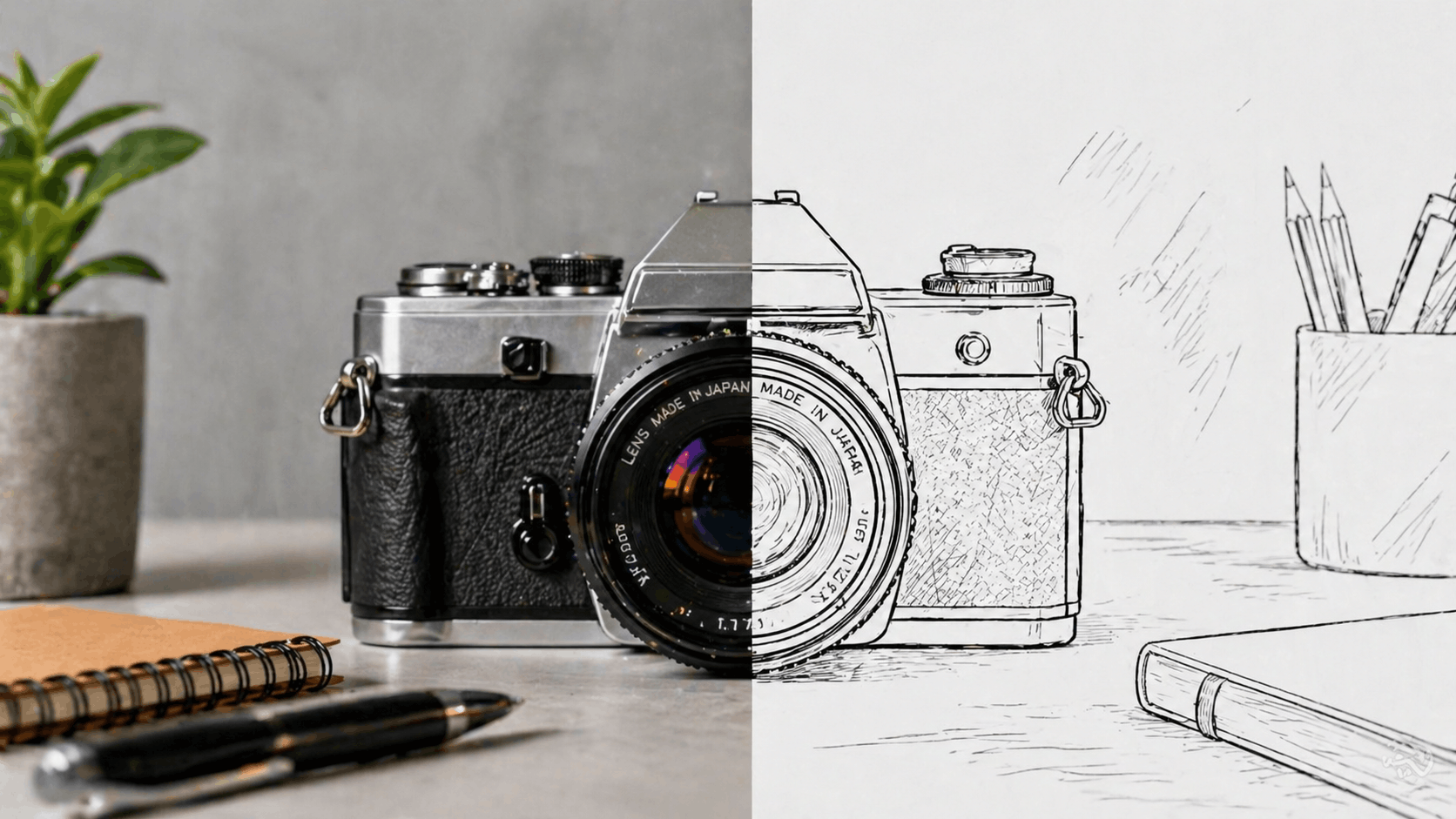
Image to Line provides an AI-powered utility that processes raster images (JPG, PNG) and extracts their outlines to create "line art" or "sketches." Unlike basic photo filters, the platform uses intelligent algorithms to distinguish between background noise and essential subject contours. The result is a crisp, black-and-white output that serves as a perfect canvas for further digital editing, physical coloring, or technical documentation.
Key Features and Capabilities
- Instant Edge Extraction: Rapidly identifies primary and secondary outlines in a photograph to produce a professional sketch look.
- Customizable Sensitivity: Allows users to adjust the "strength" of the lines, enabling a choice between minimalist silhouettes or highly detailed technical drawings.
- AI-Driven Optimization: Specifically tuned for various subject matters, ensuring that human portraits, architectural structures, and nature scenes are handled with appropriate line weight.
- Privacy-First Processing: Many of the tool's functions are designed to work with minimal data retention, making it a reliable choice for creators concerned with intellectual property.
- Zero-Barrier Access: The platform is built for speed, requiring no complex software installations or advanced design knowledge.
Use Cases and Practical Applications
The applications for Image to Line span across multiple industries and creative hobbies:
Education and Parenting: Teachers and parents can instantly turn family photos or educational diagrams into printable coloring pages for children, fostering creativity and motor skill development.
Technical Illustration: Engineers and DIY enthusiasts can convert photos of machinery or household projects into clean line drawings for use in manuals, patents, or instructional guides.
Tattoo and Vector Design: Professional artists use the tool as a "base layer" for tattoo stencils or vectorization workflows, significantly cutting down the time spent on initial drafting.
Why This Startup Stands Out
What makes Image to Line particularly compelling is its commitment to utility over complexity. In an era where many AI tools are becoming increasingly bloated with features, this platform focuses on perfecting one specific task. By providing a high-fidelity output that is specifically "clean"—meaning minimal artifacts and stray pixels—it solves the biggest pain point of automated sketching tools. Its lightweight nature makes it a perfect companion for the "Print on Demand" (POD) community and digital stationery creators who need high-volume asset generation.
Conclusion
Image to Line is a testament to how targeted AI tools can empower the creator economy. By turning the sophisticated process of edge detection into a one-click experience, the platform opens up new possibilities for content personalization and technical clarity. As digital "analog" activities like adult coloring and custom journaling continue to grow, tools that bridge the gap between our photos and our creativity will remain essential.
Share your startup idea on StartupIdeasAI.com to get discovered by founders, investors, and innovators.
Frequently Asked Questions
Is Image to Line free to use?
The platform offers a robust free version that allows users to convert images quickly, making it accessible for casual creators and students.
What types of images work best with this tool?
High-contrast images with clear subjects work best. Photos with simple backgrounds allow the AI to more accurately identify the primary outlines of the object or person.
Can I print the output directly?
Yes. The output is typically a high-contrast PNG or JPG that is ready for home printing or professional use in design software like Adobe Illustrator or Inkscape.
Does it work on mobile devices?
Yes, the web-based interface is optimized for both desktop and mobile browsers, allowing for on-the-go conversions.
Can I use the results for my commercial projects?
The line art generated is generally yours to use, but users should always verify the current terms of service for commercial licensing and usage rights for high-volume business needs.